
Choose the quality and shape of your video
Pick 1080p or 4K, landscape, vertical or square, and what gets recorded.
The quality button sits at the end of the recording bar and shows your current choice, for example “1080p · 60 fps”. Change it before you start recording.
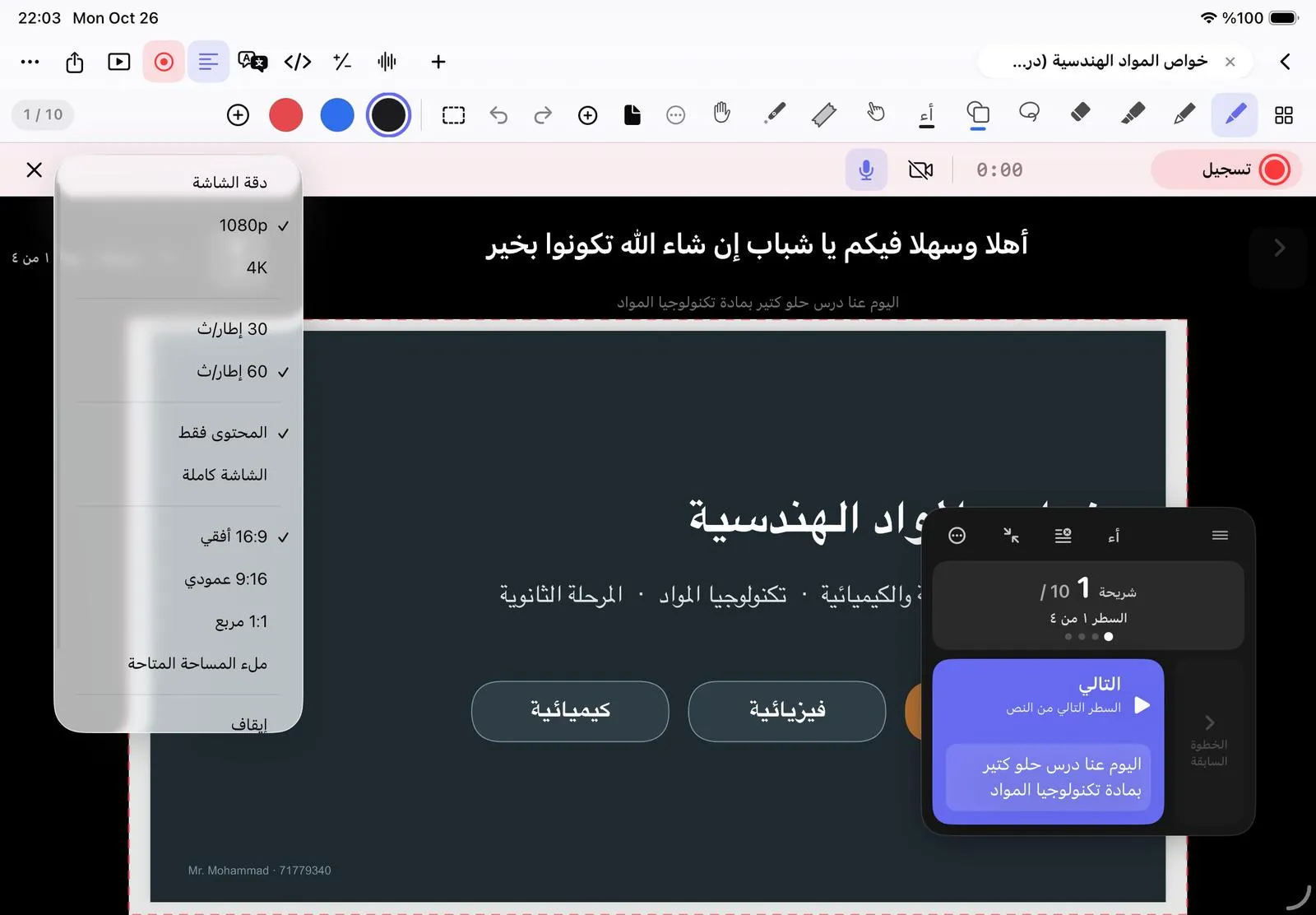
- Resolution: Screen native, 1080p or 4K.
- Frame rate: 30 or 60 fps. 30 makes smaller files.
- Record: Content only records just the page; Whole screen records the app under your tools, useful for showing how something works.
- Video format: 16:9 Landscape, 9:16 Vertical, 1:1 Square, or Fill available space.
- Countdown: Off, 3 s or 5 s.
Making a Reel or a TikTok? Choose 9:16 Vertical: the page becomes a tall frame and the video comes out 1080×1920.
On the free plan, recordings are in HD with a small NoteM watermark. NoteM Pro records in 4K without it.
Was this article helpful?
Thanks for telling us.